Duplicate shortcuts using Ivanti Workspace Control and App-V 5
When you’re using Ivanti Workspace Control (IWC) and you have imported App-V 5 packages you’re likely to have encountered the duplicate shortcut problem. In short: IWC creates a managed shortcut in the start menu for you’re App-V application, but when you launch it an extra (unmanaged) shortcut in the start menu appears for the same application.
This is standard behavior for App-V. There’s a fix described in this Ivanti KB article which involves exporting the manifest xml from the package, changing the path for the shortcut creation and importing the xml back in the package. This works fine but the problem is that this process can’t be automated (and I automate practically everything). Also, it’s needlessly complicated for there is a better way to address this issue.
App-V also creates two xml files outside of the package:
* DeploymentConfig.xml
* UserConfig.xml
These xml files can override settings in the app-v manifest file. All you have to do to stop App-V from creating shorcuts in the start menu is to set Shortcuts Enabled to false in one of these files and add the file to the application in IWC . I like to use the UserConfig file because it has the highest priority.
For example: let’s say I’ve packaged Firefox ESR. The first step would be to open the UserConfig file, find the Shortcuts section and set the Enabled attribute to false:

Now we import our new package in IWC and assign the UserConfig file to the application (sorry for the dutch language in the screenshot but IWC refuses to set my console language to English) :
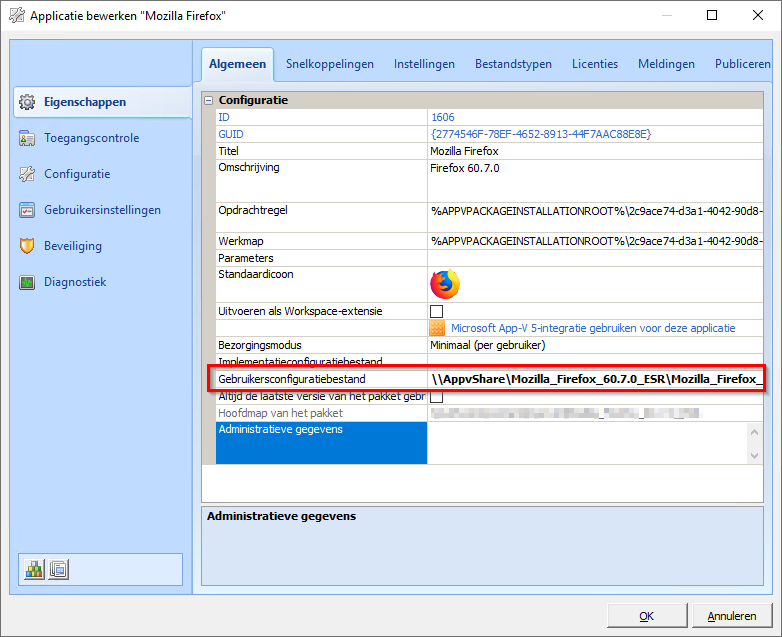
So there you have it! Much easier, cleaner and most importantly (to me) it can be automated. Here’s a powershell function you can use to automate the xml edit:
# Disable shortcuts in an App-V configuration file
function Disable-AppVShortcuts
{
    Param(
        # Path to the configuration file
        [string]
        $ConfigFilePath
    )
    If (Test-Path $ConfigFilePath)
    {
        $XML = Get-Content $ConfigFilePath
        $XML.GetElementsByTagName('Shortcuts')[0].Enabled = 'false'
        $XML.Save($ConfigFilePath)
    }
    else
    {
        Write-Error "Unable to find configuration file $ConfigFilePath" -Category ObjectNotFound
    }
}

Is an all-round IT engineer with special skills in Microsoft, Citrix, RES and VMware products. Loves a challenge in his work and has taught himself scripting. Initially batch scripts, and later PowerShell. This helps him to automate processes and procedures, and to develop his own management tools which can be used every day.
Core qualities
Team player, enthusiastic, eager to learn, sociable, positive
Hobbies
Football, playing music, watching movies and series
Job description
Senior Technical Specialist
To enable the language change in the console, ensure you have the location, set at Composition \ User Settings, available in the context of the console (Use a mapping or a subst).