You might be having an issue with a Citrix virtual driver
I recently upgraded Citrix Receiver 4.7 to Citrix Workspace App 1904 and came across this issue: when logging in the following error occurred:
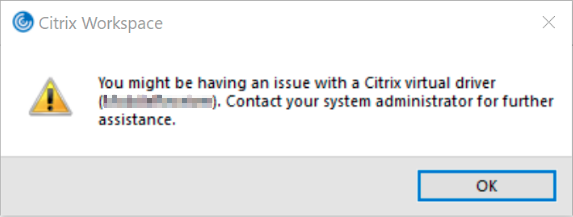
I’ve blurred the driver name in parentheses because it can be different in your case. In our case the driver was called RESWSL. I never heard of this driver and neither did google (it’s probably RES ONE WorkSpace Licensing). I did find Citrix Knowledge base article CTX238932 where this error was featured. It pointed my attention to registry key HKEY_LOCAL_MACHINE\SOFTWARE\Citrix\ICA Client\Engine\Configuration\Advanced\Modules\ICA 3.0.
However, even though my VirtualDriverEx registry value was indeed empty my error couldn’t be fixed by correcting it’s data. Then I noticed that the VirtualDriver registry value contained a list of drivers that corresponded with the sub keys of the Modules key (parent of the ICA 3.0 key). All but one: RESWSL. I removed the missing driver from the list and presto! All was well again.
In conclusion: if you come across this error after upgrading your Receiver/Workspace App check the driver mentioned in parentheses in the VirtualDriver registry value. If it doesn’t have a matching key in Modules simply remove it and you’re good to go. Or you can find a client that hasn’t been updated and still has the corresponding Module registry key and copy it over.
PS. If you’re on a 64-bit OS make sure to use the WOW6432Node software key

Is an all-round IT engineer with special skills in Microsoft, Citrix, RES and VMware products. Loves a challenge in his work and has taught himself scripting. Initially batch scripts, and later PowerShell. This helps him to automate processes and procedures, and to develop his own management tools which can be used every day.
Core qualities
Team player, enthusiastic, eager to learn, sociable, positive
Hobbies
Football, playing music, watching movies and series
Job description
Senior Technical Specialist
This solution was the perfect fix. Thanks! My driver was different but removing it from the registry was the solution.
I’m glad you found it helpful
solved my issue. Thank you
I’m glad it helped you.
Great, my problem was fixed as well. Thank you!
a big thanks
Upgraded to Citrix 2002 and had issues with the Flash and Flashv2 drivers, from the same registry key. Removed them and now seems to be working.
Thanks for the tip!
Thanks for this. Fixed a client issue just now.
This is awesome! Thanks very much! I have uninstalled all Adobe Flash components and my Citrix didn’t work because of that. I have followed this post to remove the ‘Flash, Flash2’ from my registry and it worked perfectly!
Saved us from reimaging a couple computers. Thanks!
Hey Michaja, I am getting the same error for the ClientPrinterQueue, which is not missing from the Modules tree of subkeys. Are you suggesting we delete the subkey if it is missing from VirtualDriver list under ICA 3.0? What am I doing wrong in troubleshooting this?
If you find ClientPrinterQueue in the VirtualDriverEX you should remove the value.
if not you need to check the VirtualDriver and add that value. if I understood it correctly. it worked for me
Thank you! Problem solved!
Hi this solution fixed my issue. Thank you!
Ive found some company laptops that doesnt have the HKEY_LOCAL_MACHINE\SOFTWARE\Citrix\ICA Client\Engine\Configuration\Advanced\Modules\ICA 3.0.
And it stops at HKEY_LOCAL_MACHINE\SOFTWARE\Citrix\ICA Client\
I do find the whole string if I go into Current user but that wasnt right either as i suspected sense the issue still was a thing after I added the value.
Anyone know why I cant follow it all the way to
HKEY_LOCAL_MACHINE\SOFTWARE\Citrix\ICA Client\Engine\Configuration\Advanced\Modules\ICA 3.0.