Migrating a WSFC with RDM’s to a different ESXi host cluster in vSphere 8
Sometimes there are migration situations that aren’t that common and will set you out on a journey in search of the correct migration procedure. This happened to me when a customer had two ESXi host clusters, one for development and test, and one for acceptation and production. When the time came for the hardware to be replaced, they also wanted to make a new layout of the staging environments to cut licensing costs. So in the new situation there still would be two ESXi host clusters, but one would serve development, test and acceptation, and the other one would only serve production.
This had some implications as both ESXi clusters where separated on the storage and the network layer. For the most part it was easy as we could use storage vMotion to move the VM’s to the other cluster. We only needed to add an extra vmkernel for vmotion traffic in the network of the destination cluster. But then came the Windows Server Failover Cluster (WSFC) with SQL. This was a two-node cluster with Raw Device Mappings (RDM) to the storage array over fiber channel. As most of you will know, this type of VM’s can do a vMotion, but not a storage vMotion. (https://knowledge.broadcom.com/external/article?legacyId=1037959)
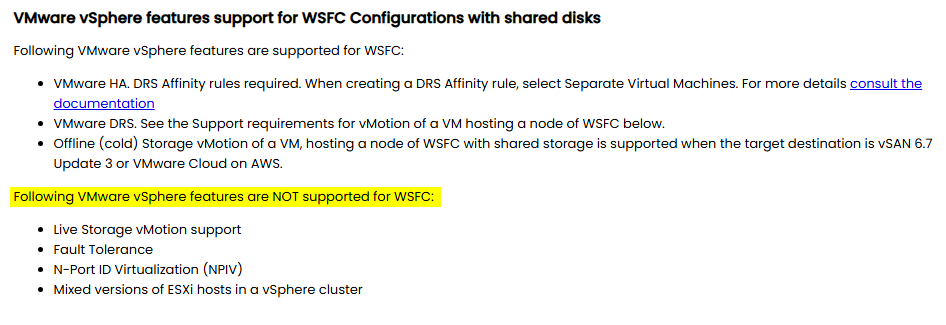
So, to move these two nodes/VM’s we should do a cold storage vMotion and present the LUN’s used by the WSFC to the new cluster. But when we asked the storage team to present the LUN’s to both ESXi clusters, they were reluctant to do so. They said because it is a different ESXi cluster, the read and write actions wouldn’t be coordinated which could result in data corruption. This was the first problem we encountered. We couldn’t have the LUN’s presented to the source and destination ESXi cluster at the same time, so we’d have to plan the steps for migration carefully.
The second problem was that this particular scenario isn’t common and therefor not widely documented. When looking for documentation from VMware on this issue, there was very little to find (https://knowledge.broadcom.com/external/article/337539/migrating-virtual-machines-with-raw-devi.html https://knowledge.broadcom.com/external/article/387001/how-to-migrate-storage-vmotion-datastore.html https://knowledge.broadcom.com/external/article?legacyId=2107923). Also on the forums there were mainly old threads. All I saw coming back was the statement: “Don’t forget to re-attach the disks after the migration.”. And this had me worried a little bit, because in my ideal scenario I wanted to change as less as possible. Eventually I also found a white paper from 2020 about setting up a WSFC on vSphere 7 (https://www.vmware.com/docs/vmw-vmdk-whitepaper-mmt). It wasn’t what I was looking for, but it gave some direction as it specified the supported and not supported features.
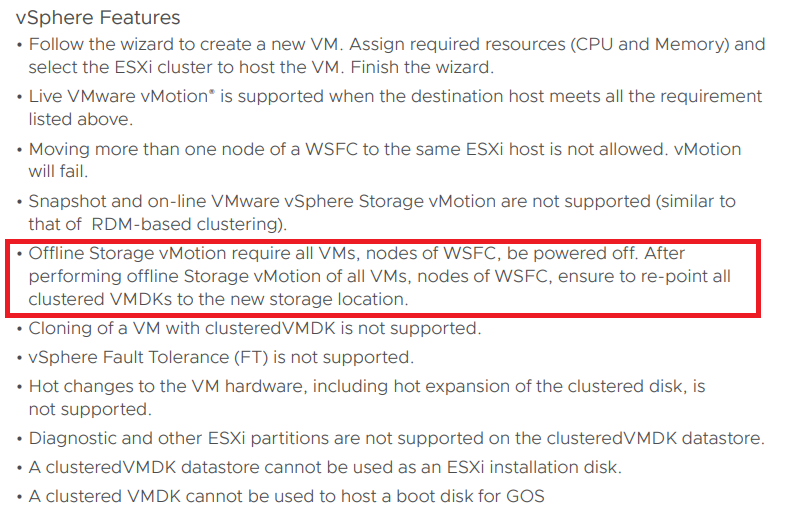
So, after reading all that I could find about this topic, I made a procedure on how to migrate the WSFC SQL cluster to the new ESXi cluster and it worked like a charm. These are the steps I have taken:
- First failover all roles to the first node (the VM containing the RDM pointer files) and shutdown the roles.
- Shutdown the second node of the WSFC (so you are certain that the cluster role is also on the first node).
- Shutdown the WSFC.
- Shutdown the first node of the WSFC.
- Remove the RDM disks from the second node (these disks point to the first node where the actual pointer file to the storage resides).
- Now you also have to remove the RDM disks from the first node. Normally you could leave these intact, but as the storage LUNs are not presented to both ESXi clusters, trying to do a storage migration will fail.
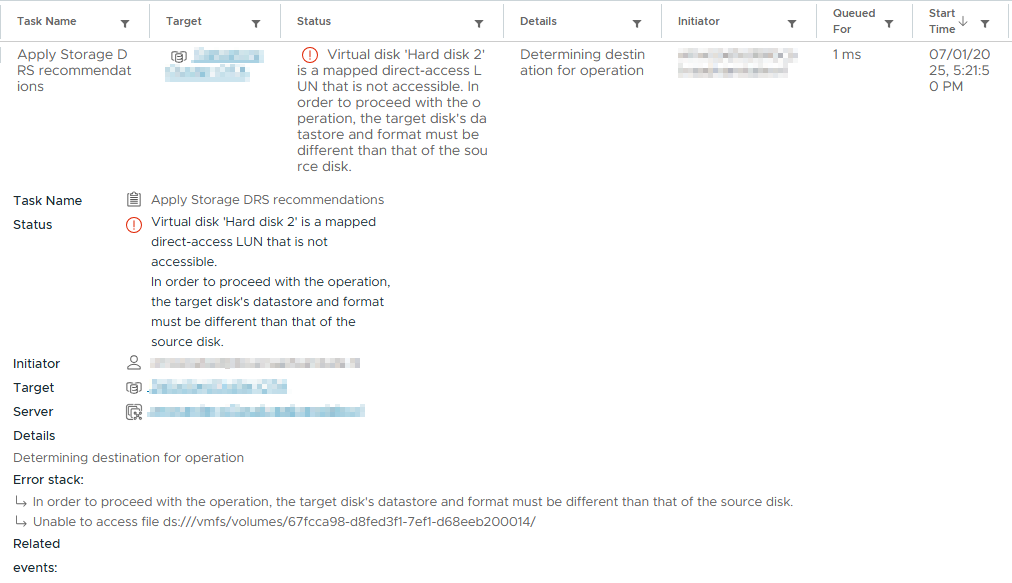
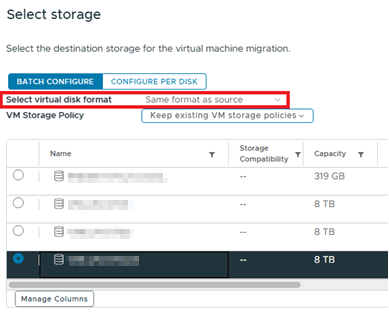
When you delete the RDM disks from the VM, you’ll have two options: delete with or without data. If you choose delete with data, the VMWare documentation says that not the data on the RDM is delete, but only the point file is deleted. If you choose to deleted the RDM disk without deleting the data, the pointer files will still be there. However, after a storage vMotion the pointer files will be gone. So, in a way it doesn’t matter what you choose here. - Perform a storage vMotion of both VM’s and take notice that “Same as source” is selected as you don’t want to convert your RDM’s to VMDK’s.
- After the storage vMotions have completed, it’s time for some storage action. Unpresent the LUN’s used by the WSFC from the old ESXi cluster and present them to the new ESXi cluster.
- Do a “rescan storage” on both the ESXi clusters and confirm that the LUN’s are gone from the old ESXi cluster and presented with the correct LUN IDs on the new ESXi cluster.
- Now because the pointer files are gone (step 6), we have to add the RDM disks as new RDM disks to the first WSFC node/VM. This will create new pointer files. Make sure that you’ll add them in the correct order and configure them with the same SCSI settings as they had before.
- On the second node add the RDM disks as existing disks and point to the first node. (both these steps (10 and 11) are described in procedures when setting up a WSFC on VMware).
- Add both VM’s to the VM overrides in the configuration of the datastore cluster where they are now a part of.
- Power on the first node/VM and check in the Windows disk manager if all disks are present.
- Power on the second node/VM and check in the Windows disk manager if all disks are present.
- Open the cluster manager and start the cluster.
- Bring the roles online and move the to there original hosting node.
I know it is a legacy system and nowadays most people will built there WSFC with shared VMDK’s, but there are also a lot of old clusters around. So hopefully this helps someone that is in that same situation.

Started his working life as a system manager at a health care organization. Is now a dedicated technical consultant at PepperByte. Specialist in virtualization and security.
Core qualities
Eager to learn, punctual, fun, loyal, patient
Hobbies
Socializing, watching television series and sports
Job description
Technical Consultant
Leave a Reply
Want to join the discussion?Feel free to contribute!