Changing the update mechanism from baselines to an image profile fails with an error
“Failed to verify whether cluster contains payload from unsupported solution(s)”. Well there is an error you don’t see every day. And if you are here reading this, you are one of the few who have a misconfiguration in your network infrastructure.
Let’s start at the beginning. VMWare will stop the support for updating hosts with baselines and so you’ll have to start using the new image profiles to update your ESXi hosts. This system actually works pretty great, but before you can make use of it, you’ll have to switch from baselines to images.
This is a fairly easy process. However, if you have a special configuration in your vSphere environment you could get errors. We got such an error: “A general system error occurred”.
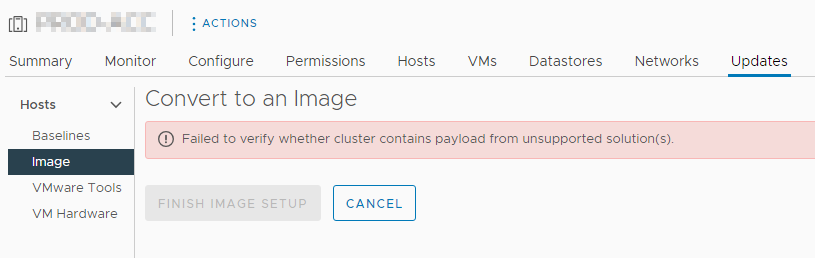
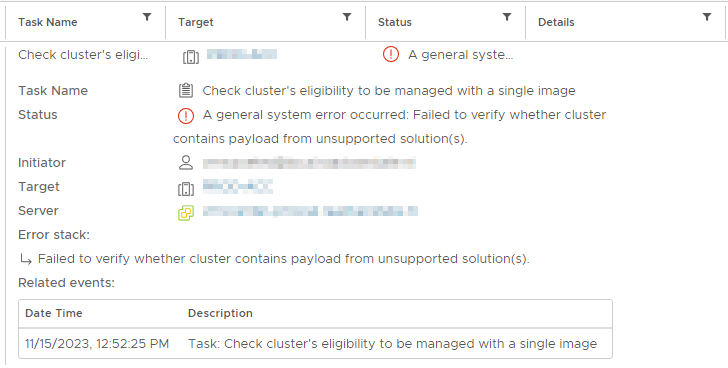
So, what was the problem here? In the past the company started with the segmentation of their network. And in preparation for this the hosts were configured with 2 management adapters, one in the old subnet and one in the new subnet. Apparently, this doesn’t work well with the check for the cluster eligibility to be managed with a single image. After removing the extra management VMKernels – so every ESXi host had just one management adapter – the check completed successfully and the new image updating could be used.

Started his working life as a system manager at a health care organization. Is now a dedicated technical consultant at PepperByte. Specialist in virtualization and security.
Core qualities
Eager to learn, punctual, fun, loyal, patient
Hobbies
Socializing, watching television series and sports
Job description
Technical Consultant
Leave a Reply
Want to join the discussion?Feel free to contribute!