Unable to add a storage place in BizzDesign Enterprise Studio App-V package
I had the following issue with an Enterprise Studio App-V package: users reported they where no longer able to add a storage place. A window would open but the embedded browser was empty so it was impossible to authenticate. We had updated the App-V package over a month ago but have had no issues during testing and for a few weeks after releasing it to the production environment. When I installed the software locally in my VDI session it worked fine, so the issue had to be in the package.
After painstakingly checking every line in my procmon results I managed to find the problem. The new client now uses Edge Webviews embedded browser instead of CEF (Chromium Embedded Framework). During setup the EdgeUpdate executable is used to check/update Edge Webview. The result is that the path to the embedded browser dll is in the Virtual Registry System of the App-V package and this path has a version number in it.
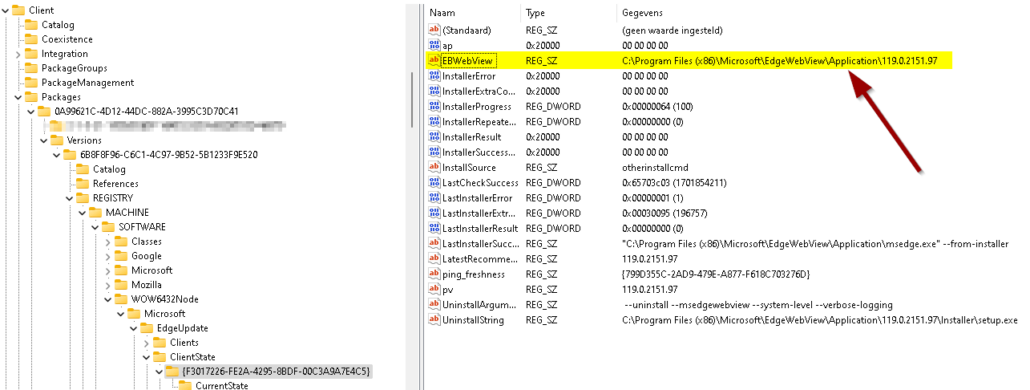
This worked fine until Webview was updated to a new version in our VDI image, rendering the path in the App-V package invalid. Enterprise Studio uses the EBWebView registry value to determine the path to the dll therefore the dll is not loaded. After removing the entire EdgeUpdate key from the package all was well again. The App-V package will find the correct path in the local registry instead of the virtual registry and the embedded browser will work just fine.
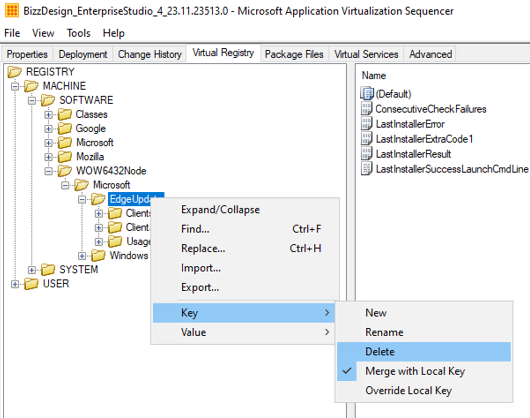
After deleting the registry key it will automatically be added to the exclusions so use this to your advantage and create a template for Enterprise Studio for your next update.

Is an all-round IT engineer with special skills in Microsoft, Citrix, RES and VMware products. Loves a challenge in his work and has taught himself scripting. Initially batch scripts, and later PowerShell. This helps him to automate processes and procedures, and to develop his own management tools which can be used every day.
Core qualities
Team player, enthusiastic, eager to learn, sociable, positive
Hobbies
Football, playing music, watching movies and series
Job description
Senior Technical Specialist
Leave a Reply
Want to join the discussion?Feel free to contribute!