VMware vCenter works with LDAPS but logins are invalid
As a good VMware administrator you configured your new vCenter Server Appliance (VCSA) with LDAPS, as Integrated Windows Authentication (IWA) is deprecated by VMware (https://kb.vmware.com/s/article/78506). Everything works fine, but after just a few days none of the administrators can login anymore and get to see: “Invalid credentials”.

So you login as [email protected] to see what went wrong. In the tasks and events you see error messages, but they only say that the username or password is wrong, but you’re sure the username and password are correct.
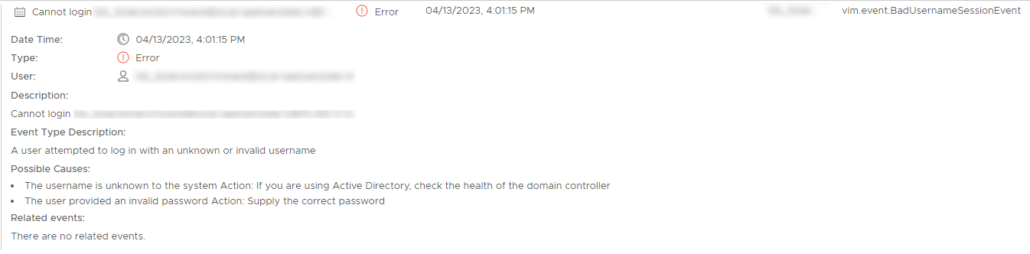
To check if the connections with LDAPS are still valid, we login to the shell of the vCenter server and ping de domain controller. That gives us a 100% success rate. Now, to check the LDAP connectionswe can do 2 things:
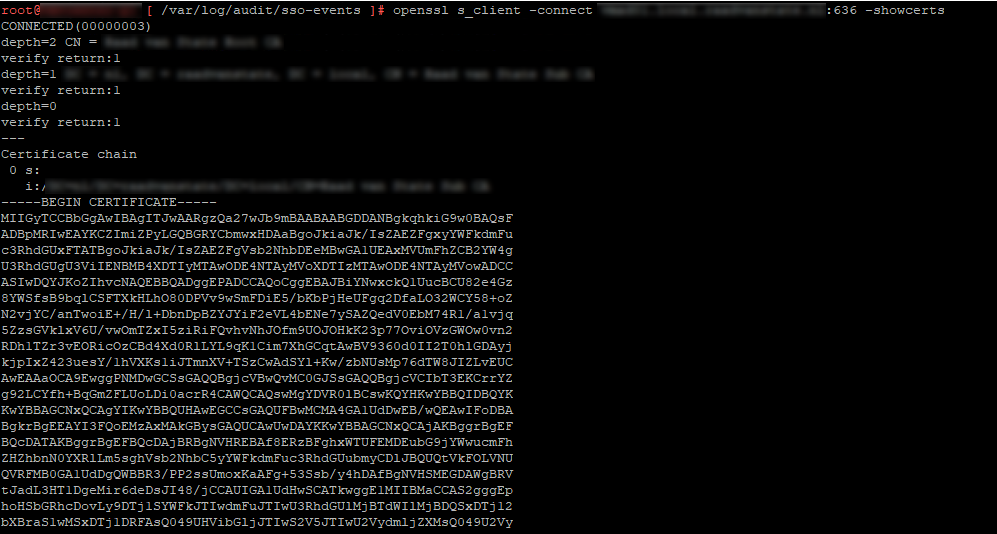
Request the certificate of the LDAPS server with # openssl s_client -connect ldapsserver.domain.local:636 -showcerts and when it says CONNECTED and gives back a certificate hash than you know your connections to the LDAPS server is established.
Or use the vdcadmintool (# /usr/lib/vmware-vmdir/bin/vdcadmintool). Select option 1 to test the LDAP connection. When it says “ldaps://ldapsserver.domain.local:636 (ANONYMOUS) bind succeeded.” you know LDAPS is working.

So, all connections are oké, but you still get the invalid credentials error message.
When we check the logs at /var/log/audit/sso-events/audit_events.log and /var/log/vmware/sso/websso.log we see the following errors:
/var/log/audit/sso-events/audit_events.log2023-04-12T11:36:50.167Z {"user":"[email protected]","client":"172.16.1.1","timestamp":"04/12/2023 11:36:50 GMT","description":"User [email protected]@172.16.1.1 failed to log in with response code 401","eventSeverity":"INFO","type":"com.vmware.sso.LoginFailure"}
/var/log/vmware/sso/websso.log2023-04-12T11:36:50.156Z INFO websso[48:tomcat-http--11] [CorId=1fdbc6f7-ce42-4e5f-8647-29b3dd909071][com.vmware.identity.interop.ldap.SslX509EqualityMatchVerificationCallback] Server SSL certificate is a trusted certificate..
2023-04-12T11:36:50.159Z WARN websso[48:tomcat-http--11] [CorId=1fdbc6f7-ce42-4e5f-8647-29b3dd909071] [com.vmware.identity.interop.ldap.LdapErrorChecker] Error received by LDAP client: com.vmware.identity.interop.ldap.OpenLdapClientLibrary, error code: 49
2023-04-12T11:36:50.159Z WARN websso[48:tomcat-http--11] [CorId=1fdbc6f7-ce42-4e5f-8647-29b3dd909071] [com.vmware.identity.idm.server.ServerUtils] cannot bind connection: [ldaps://ldapsserver.domain.local:636, CN=Daniel,OU=Users,DC=domain,DC=local]
2023-04-12T11:36:50.159Z ERROR websso[48:tomcat-http--11] [CorId=1fdbc6f7-ce42-4e5f-8647-29b3dd909071] [com.vmware.identity.idm.server.ServerUtils] cannot establish ldap connection with URI: [ldaps://ldapsserver.domain.local:636] because [Invalid credentials] therefore will not attempt to use any secondary URIs
2023-04-12T11:36:50.159Z ERROR websso[48:tomcat-http--11] [CorId=1fdbc6f7-ce42-4e5f-8647-29b3dd909071] [com.vmware.identity.idm.server.IdentityManager] Failed to authenticate principal [[email protected]] for tenant [vsphere.local]
[[email protected]]. Login failed], detailText=[Login failed], corelationId=[1fdbc6f7-ce42-4e5f-8647-29b3dd909071], timestamp=[1681299410161]
2023-04-12T11:36:50.161Z ERROR websso[48:tomcat-http--11] [CorId=1fdbc6f7-ce42-4e5f-8647-29b3dd909071] [com.vmware.identity.idm.server.IdentityManager] Failed to authenticate principal [[email protected]]. Login failed
javax.security.auth.login.LoginException: Login failed
2023-04-12T11:36:50.165Z INFO websso[48:tomcat-http--11] [CorId=1fdbc6f7-ce42-4e5f-8647-29b3dd909071] [com.vmware.identity.idm.server.IdentityManager] Authentication failed for user [[email protected]] in tenant [vsphere.local] in [28] milliseconds with provider [domain.local] of type [com.vmware.identity.idm.server.provider.ldap.LdapWithAdMappingsProvider]
2023-04-12T11:36:50.165Z ERROR websso[48:tomcat-http--11] [CorId=1fdbc6f7-ce42-4e5f-8647-29b3dd909071] [com.vmware.identity.idm.server.ServerUtils] Exception 'com.vmware.identity.idm.IDMLoginException: Login failed'
2023-04-12T11:36:50.167Z INFO websso[48:tomcat-http--11] [CorId=1fdbc6f7-ce42-4e5f-8647-29b3dd909071] [auditlogger] {\"user\":\"[email protected]\",\"client\":\"172.16.1.1\",\"timestamp\":\"04/12/2023 11:36:50 GMT\",\"description\":\"User [email protected]@172.16.1.1 failed to log in with response code 401\",\"eventSeverity\":\"INFO\",\"type\":\"com.vmware.sso.LoginFailure\"}
2023-04-12T11:36:50.167Z ERROR websso[48:tomcat-http--11] [CorId=1fdbc6f7-ce42-4e5f-8647-29b3dd909071] [com.vmware.identity.samlservice.AuthnRequestState] Caught Exception from authenticate com.vmware.identity.samlservice.SamlServiceException
2023-04-12T11:36:50.167Z INFO websso[48:tomcat-http--11] [CorId=1fdbc6f7-ce42-4e5f-8647-29b3dd909071] [com.vmware.identity.samlservice.impl.SAMLAuthnResponseSender] Responded with ERROR 401 message Invalid credentials
2023-04-12T11:36:50.167Z INFO websso[48:tomcat-http--11] [CorId=1fdbc6f7-ce42-4e5f-8647-29b3dd909071] [com.vmware.identity.BaseSsoController] End processing SP-Initiated SSO response. Session not created
Well, that was a lot of information, but didn’t bring us any closer to the problem because we can see that the connections to the LDAPS server is made, but the credentials are marked as invalid.
So after a little more comparing and ruling out the problem was not in the LDAPS server or in the vCenter server. The problem was that the admin accounts were a member of the built-in Protected User Group of Active Directory. This prevented the administrators from logging in (https://kb.vmware.com/s/article/79647).

Started his working life as a system manager at a health care organization. Is now a dedicated technical consultant at PepperByte. Specialist in virtualization and security.
Core qualities
Eager to learn, punctual, fun, loyal, patient
Hobbies
Socializing, watching television series and sports
Job description
Technical Consultant
Hi Daniel, you’re a life saver 🙂 I just had this problem and came across your article and as soon as I removed myself from the AD Protected Users group I was able to login to vCenter.
Thanks for your post.
Same issue here, but my users are not part of the Protected users Group 🙁