Ivanti Workspace – One SSO rule for all major browsers
Since Microsoft has now officially launched Edge Chromium we have to maintain yet another browser in our environment. This means another browser has to be working with Single Sign-On and although Edge is ‘made’ by Microsoft, the SSO integration is far from the same as with IE. Until now when a new site had to be working with SSO, the policy for both Google Chrome and Mozilla would be changed in the Ivanti Workspace Console. This means changing 4 different policies within 2 different apps. Now, Edge Chromium joins this group and I thought it was time to think of a solution.
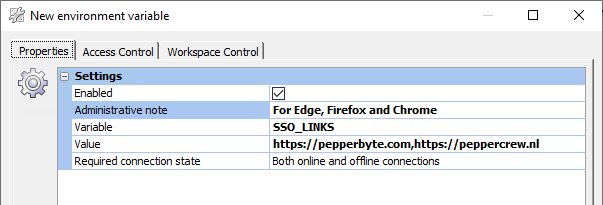
Fortunately for us, Ivanti Workspace has a thing called ‘Environment Variables’ in which you store values so you can use simply use the shortened variable. This means maintaining only one string of URLs to support SSO instead of now six. Here we create a new one, SSO_LINKS, with the supported websites comma separated.
Google Chrome and Microsoft Edge
Chrome and Edge both use the same engine so configuring policies are likewise. When editing the policy for Edge you go to Both -> Microsoft Edge -> HTTP-verification and enable both ‘Configure list of allowed authentication servers‘ and ‘Specifies a list of servers that Microsoft Edge can delegate user credentials to‘ with the value %SSO_LINKS%.

As mentioned, for Chrome this is almost the same. You go to Both -> Cat_Google -> Google Chrome -> HTTP-verification and enable both ‘Authentication server whitelist’ and ‘Kerberos delegation server whitelist’. Use the value of %SSO_LINKS%.
Mozilla Firefox
Firefox does things differently. Mozilla has a policy for NTML Delegation but as you can see, it requires one URL per line. This means inside the Ivanti Workspace Console you can’t use the SSO_LINKS variable as this is just a string with multiple URLs connected. There is an easy solution to this problem. PowerShell and the option to execute commands when starting an application in Ivanti Workspace.
So I’ve made a command which runs each time a user starts Mozilla Firefox. This then grabs the SSO_LINKS variable and for each URL inside the variable, it creates a registry value in the corresponding location to the policy.
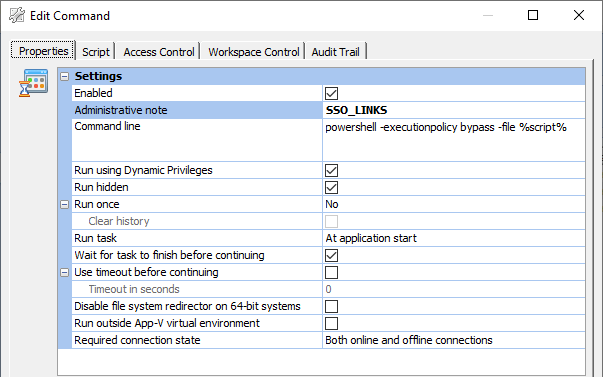
$BaseKey = 'HKCU:\Software\Policies\Mozilla\Firefox\Authentication'
$Links = ($env:SSO_LINKS).split(',')

New-Item -Path $BaseKey\Delegated -Force
New-Item -Path $BaseKey\NTLM -Force
New-Item -Path $BaseKey\SPNEGO -Force

$n = 1
ForEach ($Link in $Links)
{
    New-ItemProperty -Path $BaseKey\Delegated -Value $Link -Name $n -PropertyType String
    New-ItemProperty -Path $BaseKey\NTLM -Value $Link -Name $n -PropertyType String
    New-ItemProperty -Path $BaseKey\SPNEGO -Value $Link -Name $n -PropertyType String
    $n++
}
This will create the needed registry keys and will add each site as a separate registry value.
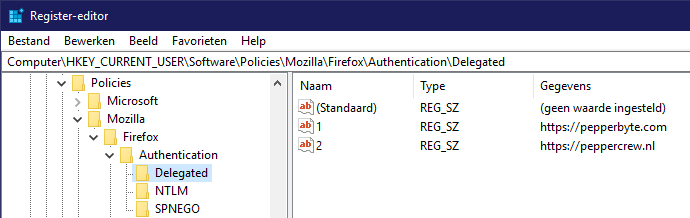
In the future whenever a new URL has to be supported for Single Sign-On the only field that has to be changed is the Environment Variable. This eliminates the chance for human error and differences between all browsers. It either works, or it doesn’t for all of them.
Leave a Reply
Want to join the discussion?Feel free to contribute!