RHEL 8 and the VMware customization hell
Normally VMware customization works pretty good. That is due to the fact that most of us only deploy or need to customize Windows servers and desktops. It kicks off sysprep, sets some predefined settings and you’re good to go.
But now we’re talking about customizing Linux and there has been some changes over the years with new packages, new tools and how to handle customization. So if your customization worked in the past, it doesn’t always work on the new template, with new software versions.
Our setup uses the following software versions:
– ESXi 6.7U3
– vCenter 6.7u3
– vRA/vRO 7.5
– RedHat Enterprise Linux 8.2
– open-vm-tools 11.0.0-4.el8
– perl 5.26.3-416.el8
At the customer they use Vrealize Automation for the deployment and maintenance of the vm’s. So after making a new Linux template and a customization specification in vCenter, I added them to a valueset for the Linux blueprint in vRA and requested a new linux vm in vRA. The deployment started and in about 15 minutes the deployment of de new server was on 99% completion. Unfortunately the progressbar stayed at 99% for almost 2 hours only to fail miserably with the message:
"The following
component requests failed: RHEL. Request failed: <vmname>:
sendEBSMessage23(workflow=c69d87ca-0382-4d0b-8eee-ff7f2c4391a6) Error in state
VMPSMasterWorkflow32.Disposing phase PRE event (queue = 0b3eae10-a899-4164-b36b-ad6691a2b97e):
Extensibility consumer error(10010) - TypeError: Cannot read property
"id" from undefined (Workflow:disposingMachineDisableCITopdeskv3 /
Define Status (item4)#6) and Machine <vmname>: CustomizeVM :
Customization of <vmname> failed.: Timeout waiting for CustomizeVM
completion event.."
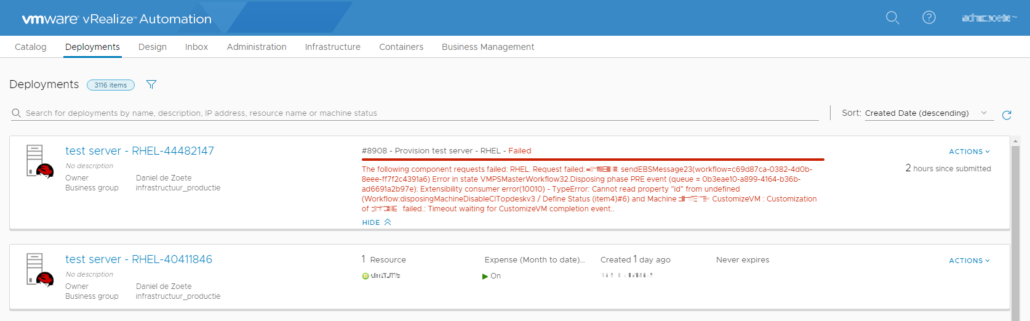
So far so good, there was only a problem with the customization, that couldn’t be a big problem (spoiler: I was wrong!).
When an error says there is something wrong with the customization, the first thing that springs to mind is that there is something wrong with the customization specification. But as there are not many things you can set, there isn’t much that you can do wrong. Next step was checking the tasks and events of the newly created vm. I knew that I had 1 hour and approximately 45 minutes to investigate the problem (15 minutes to deploy the new vm – 2 hours before the time-out and removal of the vm). In the tasks pane, every customization task was completed and had a green checkmark. But in the Events pane I saw 2 errors that had to do with customization.

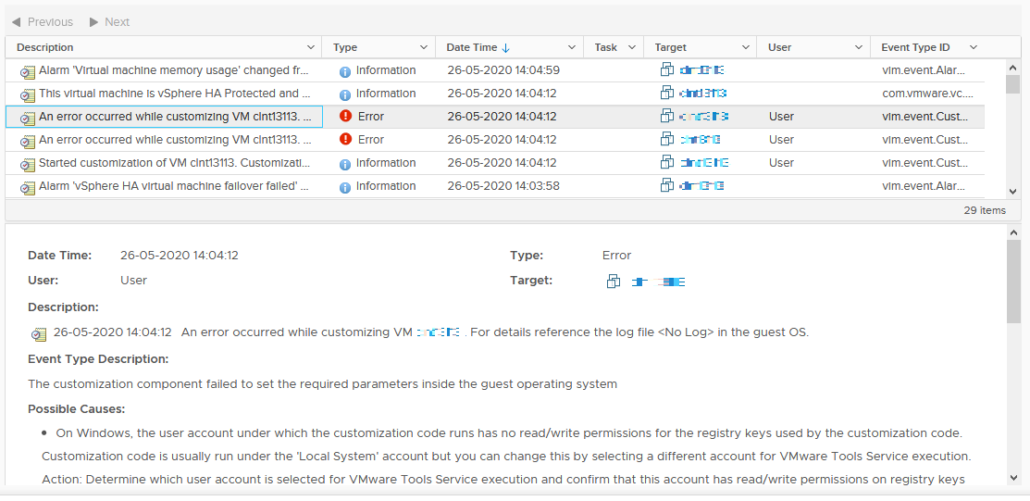
The errors stated: - “An error occurred while customizing VM <vm name>. For details reference the log file <No Log> in the guest OS.”
- “An error occurred while customizing VM <vm name>. For details reference the log file /var/log/vmware-imc/toolsDeployPkg.log in the guest OS.”
The event also gave some possible causes and what to check, like invalid or unsupported time zone, granted permissions to the root account and the need for installation of the deployPkg plug-in. As all of these fore mentioned causes where not the problem, it was off to the next step i.e. checking the /var/log/vmware-imc/toolsDeployPkg.log.
In the log file there were multiple warnings and errors, but eventually I was stuck with 1 error:
[
error] Customization command failed with exitcode: 2, stderr: Can't
locate File/Temp.pm in @INC (you may need to install the File::Temp module)
(@INC contains: .....
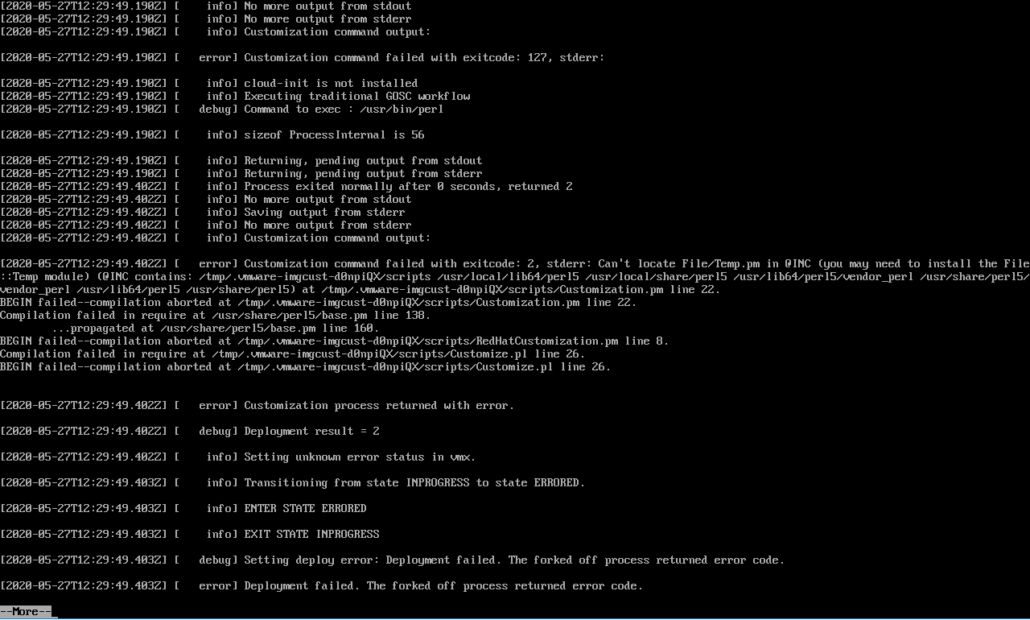
When looking at this error it became clear that the problem had something to do with Perl and a Temp module. As Perl was installed in the template vm as VMware required (https://docs.vmware.com/en/VMware-vSphere/7.0/com.vmware.vsphere.vm_admin.doc/GUID-E63B6FAA-8D35-428D-B40C-744769845906.html), this error was strange. As I proceeded with some troubleshooting it became clear that only the Perl core packages were installed on the template vm and these don’t include the Temp module. After installing the Perl Temp module (perl-File-Temp-0.230.600-1.el8.noarch), the customization would completed successfully.
So if you want the customize a Linux vm within VMware, you have 3 options of which 2 are never mentioned or documented anywhere;
- Install Perl (the complete package) on the template vm
- Install Perl Core + Temp module on the template vm
- Install cloudinit on the template vm

Started his working life as a system manager at a health care organization. Is now a dedicated technical consultant at PepperByte. Specialist in virtualization and security.
Core qualities
Eager to learn, punctual, fun, loyal, patient
Hobbies
Socializing, watching television series and sports
Job description
Technical Consultant
Thanks for this article. this helped alot as this is not documented by redhat or vmware