VCSA Backup Bug
If you want to make backup of the vCenter Server Appliance, there are multiple options to choose from. One of these is the manual method by which you login to the VAMI of the VCSA and select Backup in at the Summary page.
You’ll get a lot of different options in which way you want to backup the appliance. Unfortunately, none of them is backup to local destination, so it has to be a network location. You can choose between HTTP, HTTPS, SCP, FTP or FTPS.
You can use different tools to backup by means of the forenamed protocols, but as most people will have an IIS server at hand, this will be the easiest way. At Altro they have described neatly how-to backup the VCSA through HTTPS and FTPS.
Solarwinds is also a much-used tool to backup the VCSA through SCP or SFTP.
Unfortunately with both IIS and Solarwinds it can take you hours to get a backup as the VCSA has some bugs.
When using Solarwinds you’ll get an error stating: “Access to the remote server is denied. Check your credentials and permissions”, while you can see in the Solarwinds interface that the connection was made successful. There is no way around this one, it just is a bug in the VCSA whereby it cannot cooperate with the Solarwinds tool.
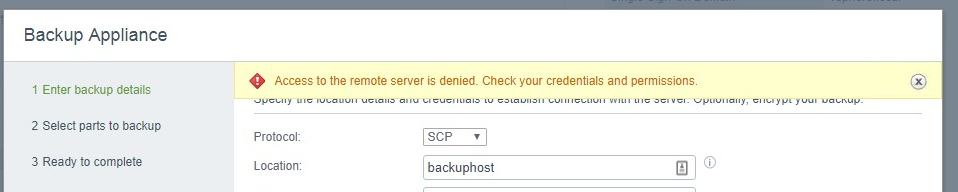
Now for IIS, you can do everything right and it should work, but it just doesn’t. The appliance will give an error stating: “Location is invalid”. It does this for HTTP, HTTPS, FTP and all other possibilities.

After searching high and low on the IIS server – as I thought that the problem was related to IIS – the problem seemed to be the VCSA, more concrete in the network configuration of the VCSA. We had a proxy server configured in the VCSA and this was causing all upload paths to be “invalid”.

After disabling the proxy configuration, the backup to IIS went just fine.

Started his working life as a system manager at a health care organization. Is now a dedicated technical consultant at PepperByte. Specialist in virtualization and security.
Core qualities
Eager to learn, punctual, fun, loyal, patient
Hobbies
Socializing, watching television series and sports
Job description
Technical Consultant
Hi Daniel,
thank you so much for your hint! I spend a whole day for searching for my fault.
Best regards
Uli
My problem was solved as i disabled proxy !
Thank you very much -:)